Here’s how a single agent typically handles this kind of request today.
“Put together a long-form piece on Agent Teams for me — grounded in 2026 data, and delivered as both Markdown and HTML.”
For a long time, this is the kind of request you would hand to a capable AI assistant. It would start typing immediately and push a wall of text back into the chat. The flow feels good, but the moment the bar on the deliverable rises, the gaps appear. Who actually does the research? Who fact-checks? Who lays the document out? And next time you come back, will the system remember any of the traps you hit today?

1. Why an Agent Team

You can keep iterating on Skills and push a single agent to deliver well on a given task. But one agent finishing the work alone always means that agent is acting as both player and referee. That contradiction is the entire reason we built Agent Team. Agent Team takes a complex task that used to live entirely inside one agent and reshapes it into a process with a front office, a back office, sign-off, and memory. The user still sends one message. Behind the scenes, the system decides whether the task should be split, which roles can run in parallel, which outputs must be verified, and which lessons should be saved. Back to the example.
“Put together a long-form piece on Agent Teams for me — grounded in 2026 data, and delivered as both Markdown and HTML.”
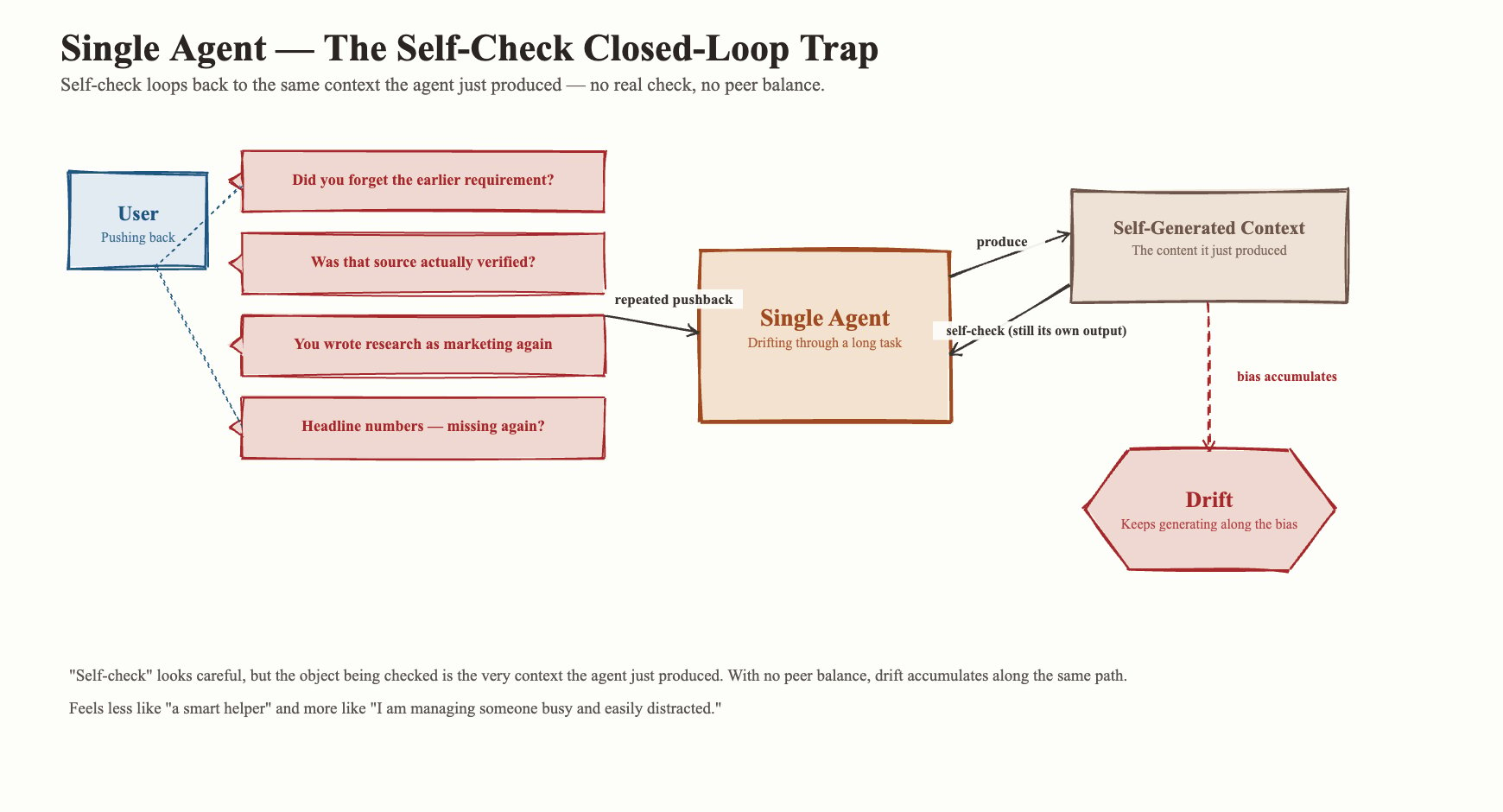
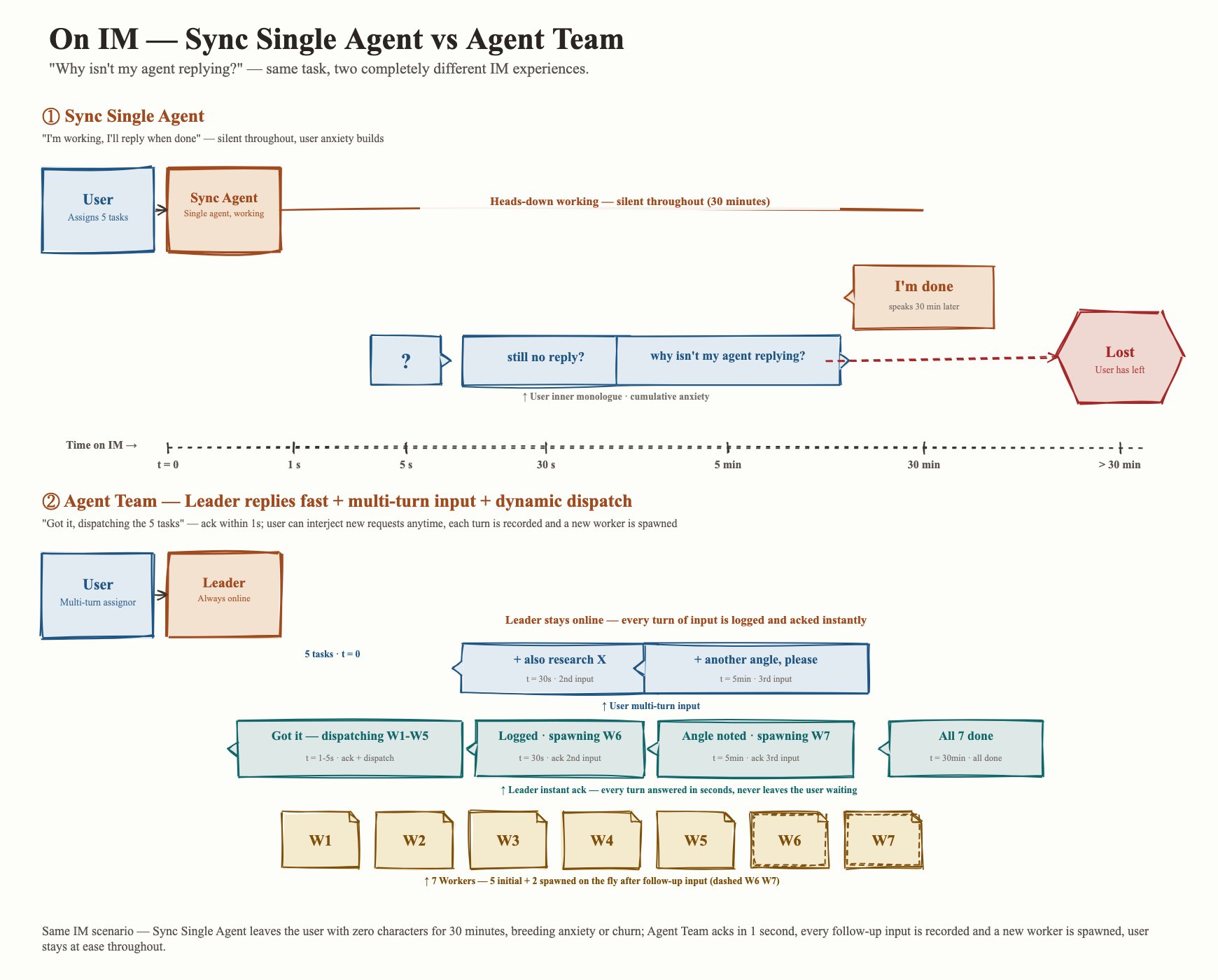
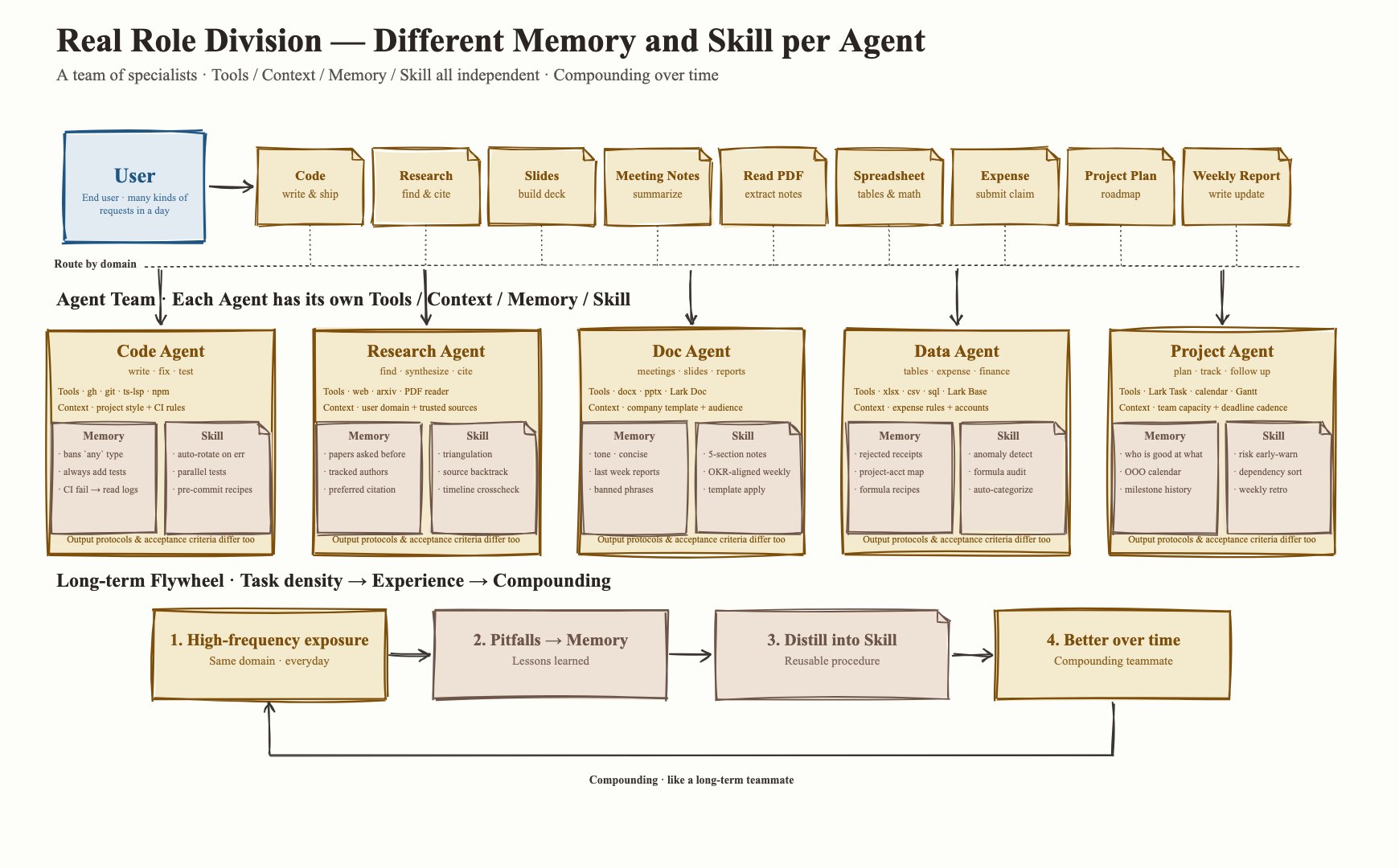
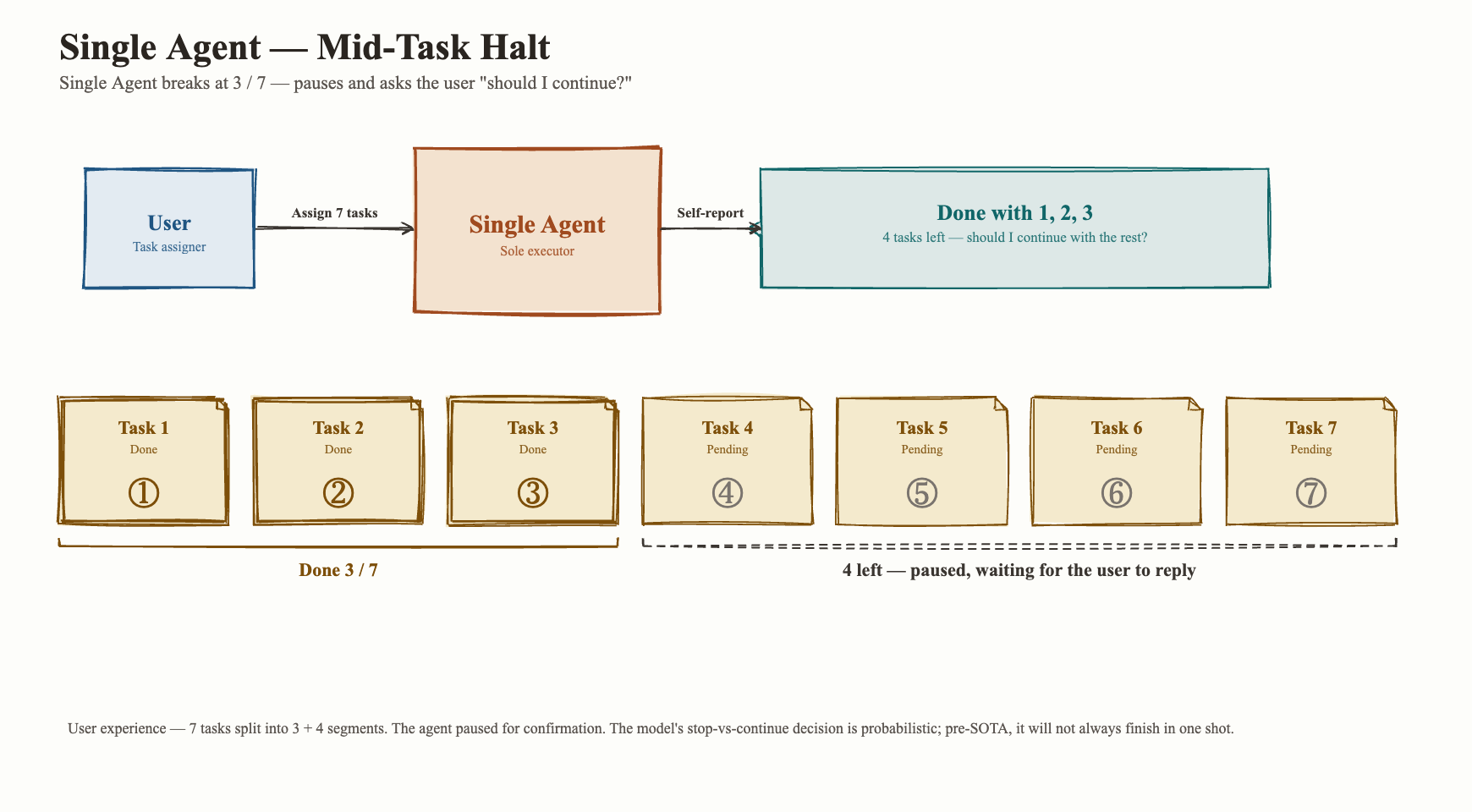
A single agent might pull this off — like a teammate sitting next to you. You ask “how can we polish this paragraph?” and it edits on the spot. You point out a formatting issue and it goes to fix it. But a few problems show up. A single agent stops when you least expect it. A common pattern: the agent has seven things to do. After three changes it pauses to report — “I’ve done items 1, 2, and 3; should I keep going on the remaining five?” Why? Models suffer from context anxiety. Training a model to handle truly long-running work takes serious money, time, and algorithmic effort. The model’s own judgment about when a task is “done enough to stop” stays fuzzy. A single agent stops mid-task A single agent gets dumber as the run goes on, and the decay is sharpest on long tasks. You feel it as the run progresses. What started as “a smart assistant” turns into “I’m babysitting someone busy and easily distracted.” You find yourself asking: do you still remember the constraint I gave you ten minutes ago? Why is the research brief reading like product marketing copy again? Once one step drifts, everything downstream drifts with it. The deeper trouble: a single agent has no natural way to balance itself. It can self-review in good faith, but the only ground truth it has access to is the work it just produced. The limits of single-agent self-review A single agent also can’t respond quickly to long-running work. This hurts most in IM (anywhere you talk to the agent through a messaging app). Patience there is short. You send a message and expect a response in seconds. Even when the work is heavy, you want the other side to come back with: “Got it, here’s how I’ll handle it, I’ll find you when it’s done.” You do not want to stare at a thread for ten minutes, half an hour, longer, just to confirm whether the agent has even started. “Why is my agent ignoring me?” is the single most common piece of feedback we get. An Agent Team gives you a different experience. The lead agent acknowledges the request immediately: confirms the goal, explains that it will split the work behind the scenes. The work breaks into chapter groups or variants and runs in parallel. You don’t have to wait for every sub-step. You get reports at the points that matter: started, blocked, decision needed, done. You can keep talking to the lead agent the whole time. “I just had another idea, can you also look into this?” The lead can respond on the spot: “Sure, I’ll spin up another group to research it and ping you with progress. For context — two of the five tasks already finished, two of the remaining three are in verification, and I’m watching the last one.” Talking to it feels like talking to a friend who actually replies to your messages on time. Agent Team's response in IM Step back from any single task and the picture is broader: user needs are diverse, and different domains call for different roles. On the same day, the same user might ask the agent to write code, look up information, build a slide deck, summarize meeting notes, read a PDF, work on a spreadsheet, file an expense, plan a project, write a weekly report. Each category has its own input shape, tool permissions, quality bar, risk profile, and delivery format. A single agent can switch hats through Skills, but switching hats is far from real division of labor. Real division of labor needs at least four dimensions on the context side — different tools, different context, different memory, different Skills — and on the output side it produces different protocols and different acceptance criteria. With an Agent Team in place, role-specific agents see more of the work that fits their function. They turn the traps they hit into memory and the moves that worked into Skills. Over time they behave like long-term coworkers: better at their jobs the more you use them. Division of labor across roles
2. How the industry is doing multi-agent today

Product / EngineHow multi-agent collaboration worksStrengthsLimitations
OpenAI Agents SDKOne agent can hand a task to another agent to continue, or temporarily call another agent to get a specialized result before resuming its own work. The system keeps the conversation, checks inputs and outputs against safety rules, and records execution.Collaboration model is clear, well-suited to handing tasks to specialist agents; built-in safety checks and execution logs make productization easier; fits customer service, business workflows, and tool-call scenarios.Multiple agents usually run as a sequential relay, native parallelism is limited; agents share one framework, so isolation is weak; better for in-product collaboration than for large-scale independent task execution.
LangGraphMultiple agents sit inside an explicit flow, each owning one step. A supervisor agent can decide who picks up next, or a complex task can be broken into multi-level teams. The system stores intermediate state to support pause, resume, and human intervention.Flow is controllable, suited to complex business; expresses branches, loops, and multi-level tasks; supports saving progress and resuming execution; delivered results are traceable and debuggable.Setup and debugging costs are high; agents mainly collaborate inside one system, independent execution is weaker; complex flows demand strong engineering design.
OpenCodeOpenCode itself is primarily a single-agent product; multi-agent collaboration isn’t its headline feature. Its core value is putting different commands, skills, permissions, and sessions through one execution path, which makes it a usable execution layer inside an external multi-agent system.Unified command surface, fine-grained permission control, well-suited to a reliable coding agent; human and agent operations reuse the same rule set; works as the execution engine inside a larger system.No complete multi-agent team mechanism internally; doesn’t handle division of labor, communication, sign-off, or scheduling across agents; if you want team collaboration, an external system has to fill the gap.
OMC / oh-my-claudecode — Team PipelineMultiple agents relay through phases: plan, refine requirements, execute, verify. If verification fails, the work enters a repair phase; after repair it re-executes or re-verifies, until success or failure.End-to-end coverage: plan, requirements, execution, verification, repair; keeps repairing after a failed verification rather than stopping at a half-finished result; suits complex coding tasks.The flow is heavy; simple tasks cost more than they should; depends on a terminal environment and several background windows; phases are fixed, so changing the plan on the fly is expensive.
Claude Code — Teams mechanismA Lead agent creates a team and assigns tasks to multiple Teammates. Each Teammate has its own context, model, and permissions, and can execute tasks on its own. The Lead dispatches work, checks status, sends messages, and shuts down members; Teammates report status when done.Deeply integrated with Claude Code, so the experience is coherent; members are context-isolated, well-suited to dividing labor; supports task management, messaging, idle notifications, and shutdown confirmation.Task assignment leans on the Lead agent’s own judgment, and stability follows the model; complex dependencies aren’t clearly expressed; some execution modes depend on terminal windows, limiting long-running cross-session work.
OMC Ralph Loop / Ralph ModeRalph keeps the task moving. It usually pairs parallel execution with verification: several execution units push the work forward, results get checked repeatedly, problems get repaired until they pass or hit a cap.Emphasizes finishing quality, suited to work that needs polishing across iterations; connects execution and verification, reducing the “halfway and stops” failure mode; fits complex development and repair work.Runtime and cost can run high; without clear check criteria, repair can loop with limited gain; iteration cap, cost cap, and stop conditions are mandatory.
OMC Autopilot + RalphAutopilot breaks the task into a full chain: analyze requirements and technical plan, build an implementation plan, execute, then Ralph continuously fills in gaps and repairs, then build, check, test, and multi-angle verification.Covers the full path from understanding the requirement to final verification; suits complex tasks that need to advance on their own; Ralph keeps repairing issues after execution, raising delivery quality.The system flow is long; suited to complex work, overkill for light edits; each stage depends on the quality of the previous one; an early misread propagates downstream; acceptance criteria have to be explicit.

3. MiniMax Agent Team: tighten the multi-agent loop, give each agent more freedom inside it

Our Agent Team is a multi-agent system led by one main agent. It breaks a complex task into several jobs that can run in parallel, hands them out to a batch of agents, and bakes adversarial quality gates into the loop — all driven by deterministic code rather than vibes. We took inspiration from Ralph Loop and the Harness school of thought. The model’s context is precious. Splitting tasks and classifying responsibilities lets us isolate the context for each step, which raises the quality of the whole pipeline. Owner / Worker / Verifier batched collaboration The Leader / Worker / Verifier loop Going from concept to a usable product needs a real collaboration loop. We boil ours down to three roles: Leader, Worker, Verifier.
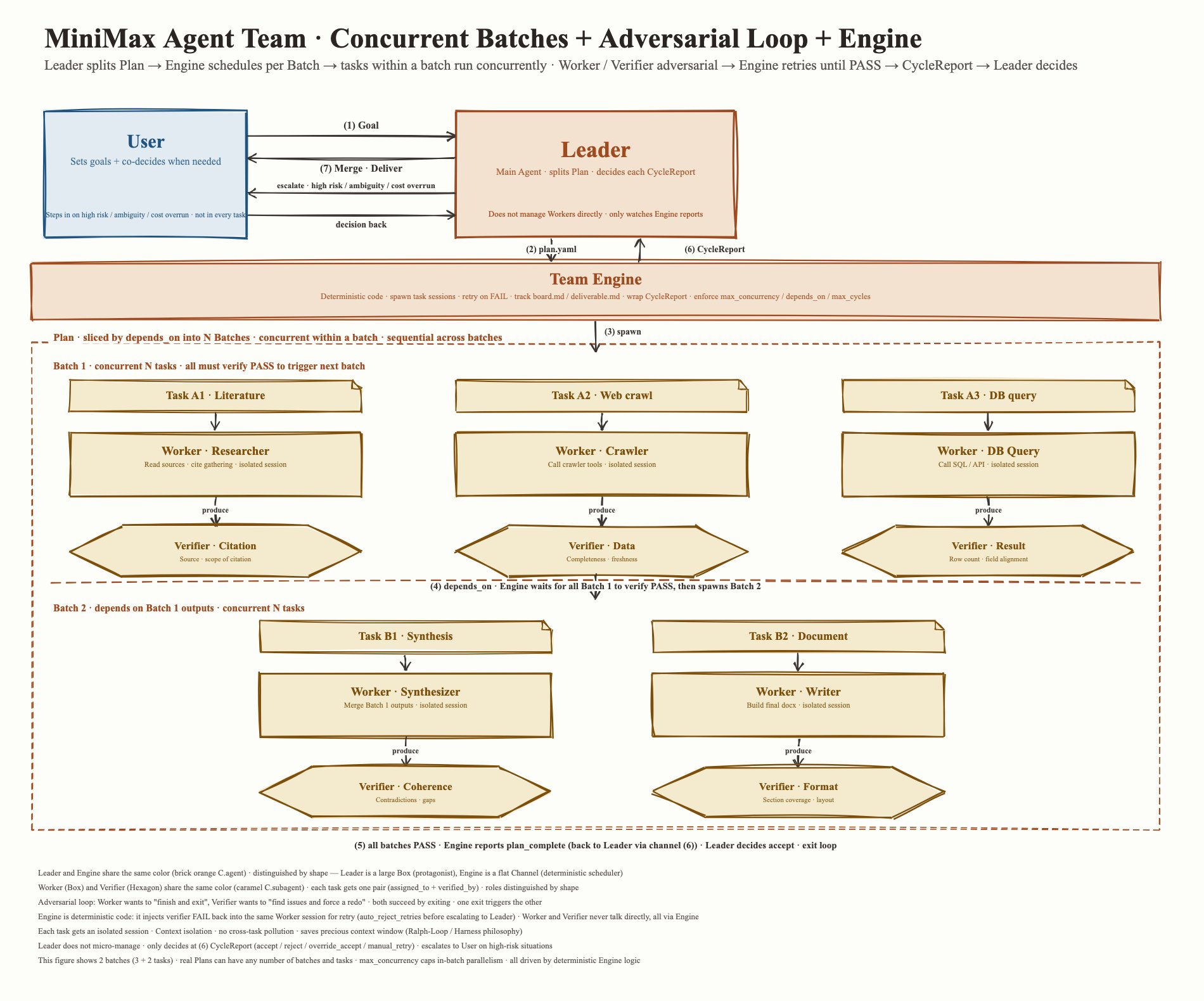
  • Leader translates a user goal into a task structure.
  • Worker runs the actual sub-tasks. Different workers can carry different tools, contexts, and output requirements. One worker handles research; another edits code. The value of a worker is specialization. The clearer the role, the easier its output is to reuse, compare, and check.
  • Verifier turns “done” into “ready to ship.” It checks sources, coverage lists, risk boundaries, and pushes back on a worker’s result with revision requests.
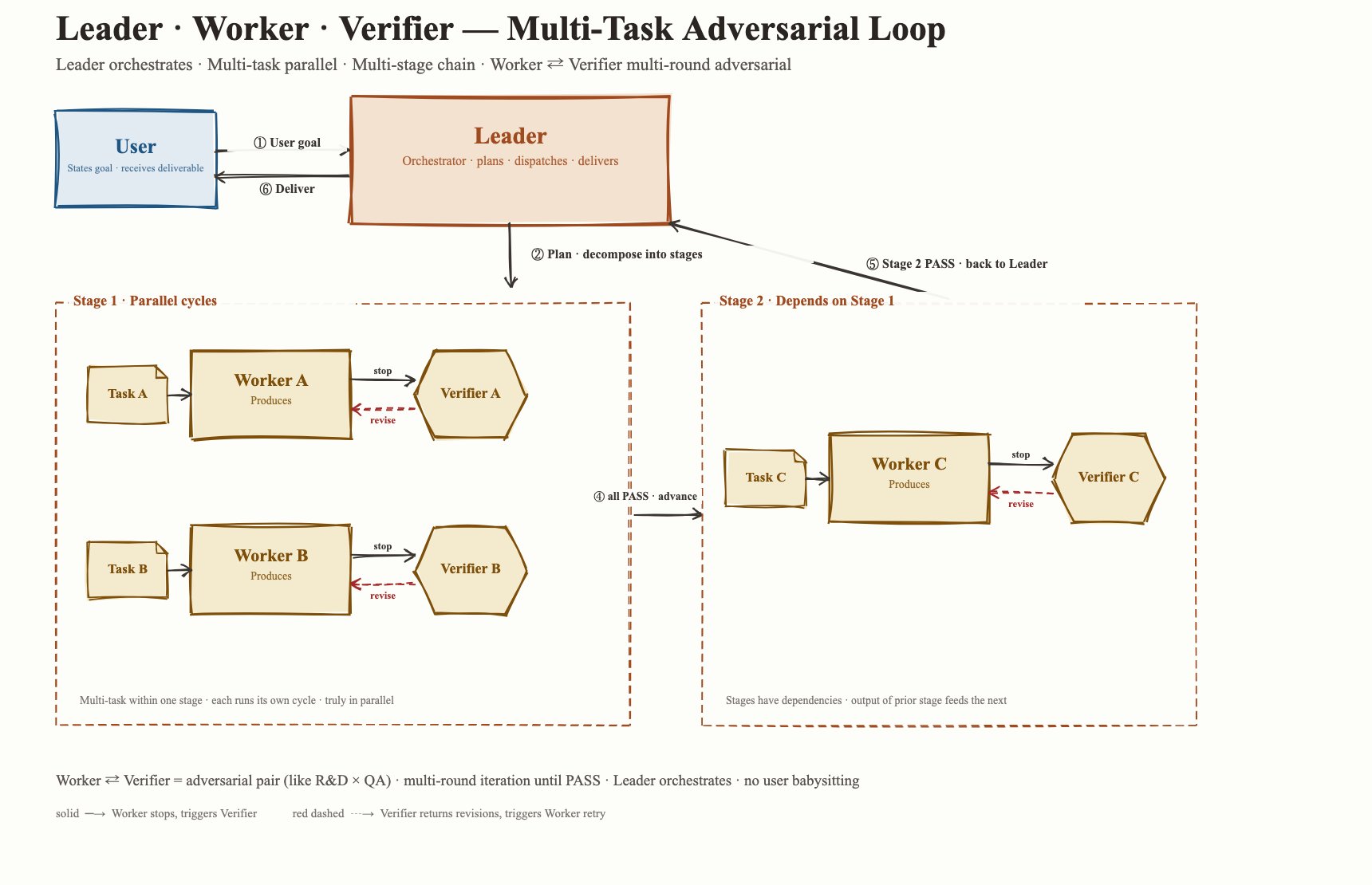
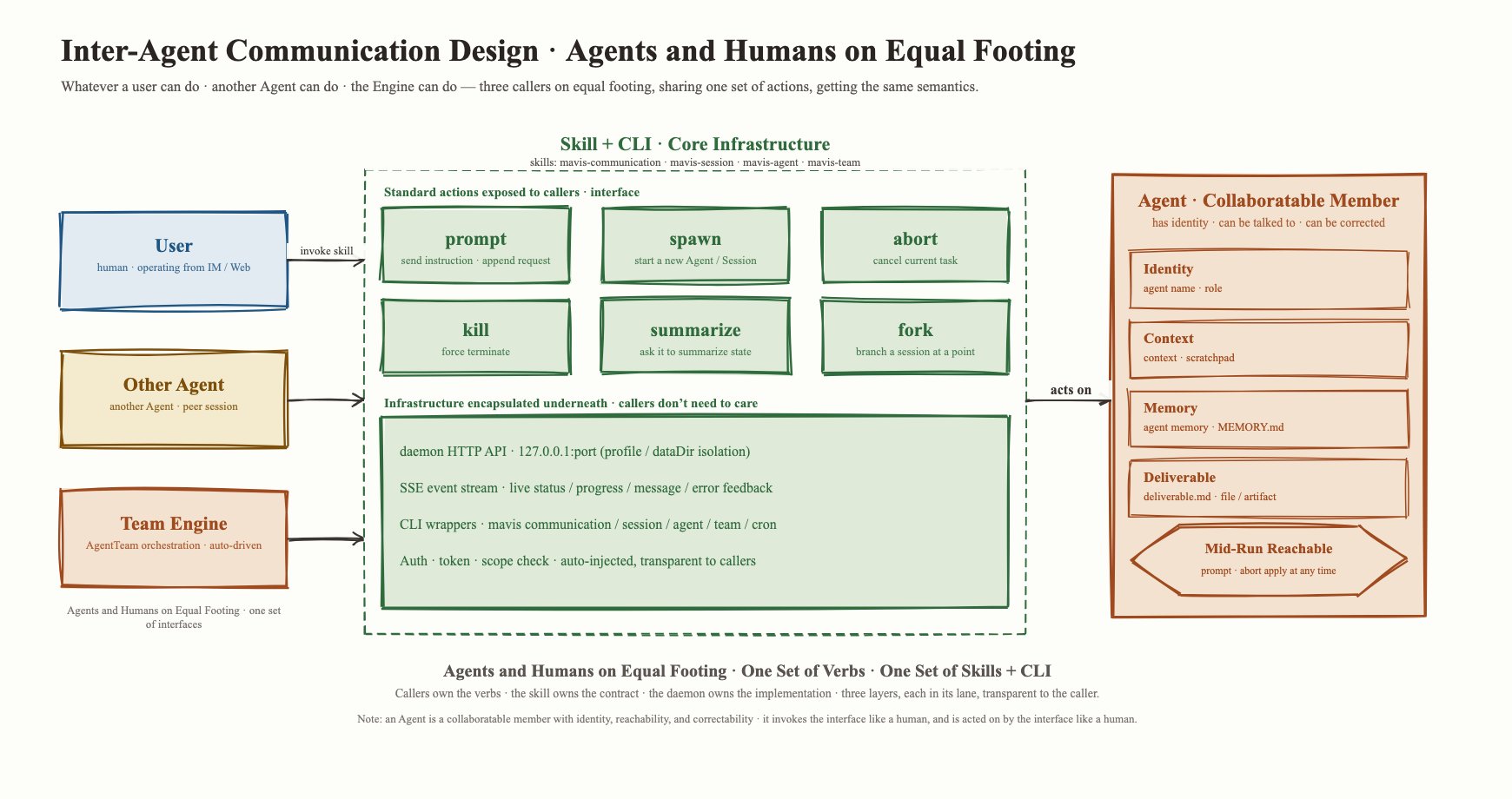
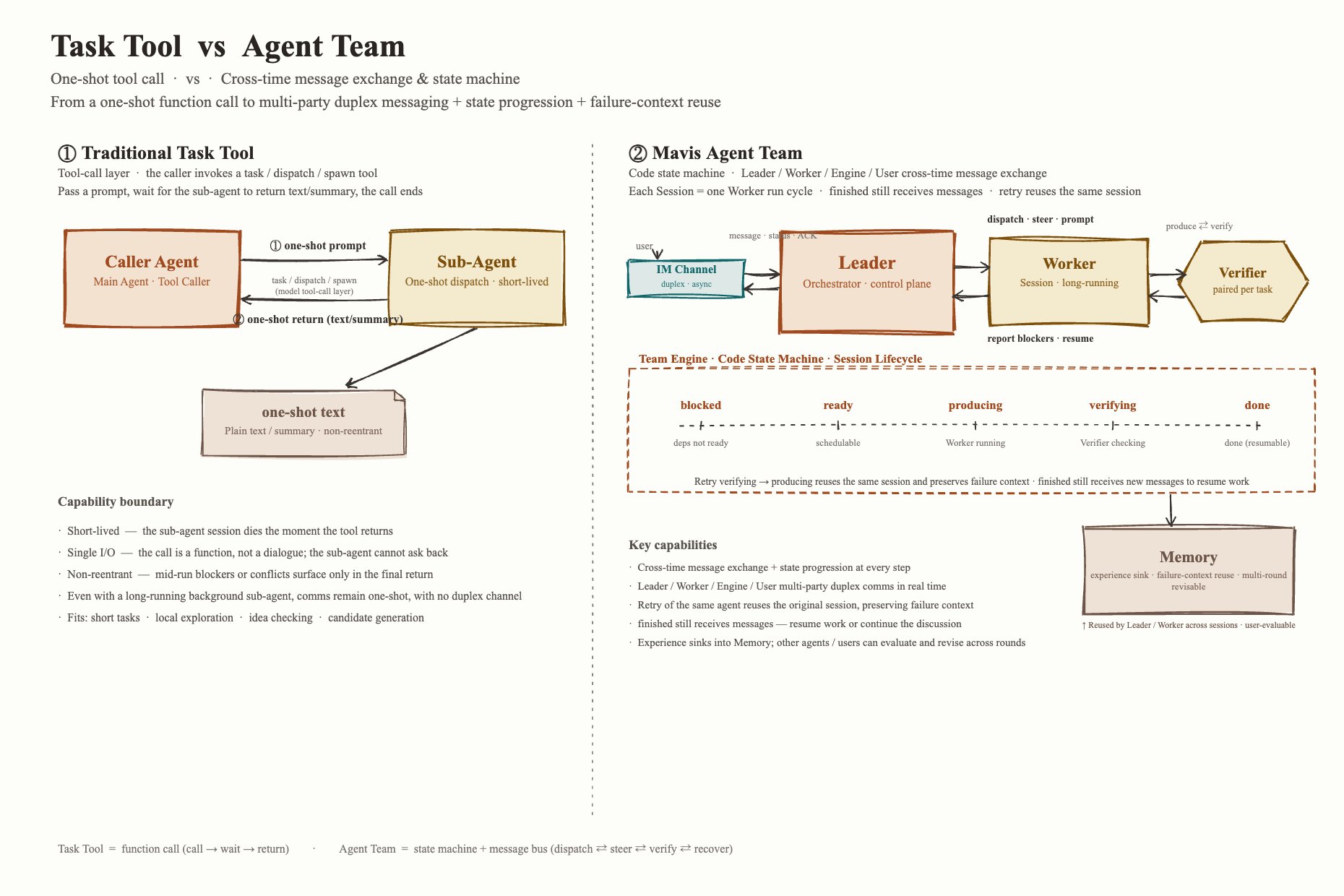
This is the design principle of an Agent Team in one sentence: WorkerAgent and VerifierAgent are adversaries by design. Both want their own run to end, but one ending triggers the other to start. Treat them like the R&D and QA functions in a company: a few rounds of adversarial iteration deliver a high-quality result, and the CEO (the human) doesn’t have to micromanage every detail. The collaboration loop from the Leader's view A Task tool can only fire and forget. An Agent Team is something you can talk to whenever you want. A traditional Task tool lives at the model’s tool-call layer. The main agent calls a task / dispatch / spawn tool, hands over a prompt, and waits for a sub-agent to return a chunk of text or a summary. That mechanism fits short-lived, low-risk, exploratory work — have another model search files, summarize material, sanity-check an idea, generate a few candidate answers. Background sub-agents exist today, but the agent-to-agent communication is still one input and one output. Real conversation isn’t supported, and live escalation of problems and contradictions isn’t either. To make a team run reliably, we built the Team Engine: a state machine that manages every agent’s run cycle, where one cycle is a Session. Team Engine moves each task through producingverifyingdone. When verifying fails, it wakes the producing node up again to revise. Throughout, the Leader receives status updates from the engine, can actively check on a specific task, and can even push extra prompts to a producing or verifying agent that’s currently running. Collaboration stops being a single function call and becomes multi-turn interaction with both proactive push and on-demand pull. Every Team run carries long-term value. The experience from this run gets saved as memory or distilled into a Skill, so each agent gets sharper at understanding the user, working with the user, and finishing the job efficiently. Task tool vs Agent Team Agent-to-agent communication: agents and humans share the same surface When we sat down to design how agents should work with each other, the most direct prompt was: think about how humans work with agents. A user can prompt, spawn, abort, or kill an agent from the front end. By the same logic, an agent itself should be able to do all of those things to another agent. We abstracted the user-facing operations into an interface, which means the actor on the other side of that interface can be a user, another agent, or the Agent Team engine itself. Agents and humans share the same surface This design has limits. Equality of surface doesn’t grant agents unlimited permission, and it certainly doesn’t take humans out of the chain of responsibility. The opposite is true: only when agents and humans share one auditable collaboration surface do permissions, responsibility, and risk become legible.
3.1. Core scenario: IM access, async execution with a fast acknowledgement

IM has a strange constraint. When you send a message, you expect a reply in seconds. But plenty of tasks naturally take minutes or hours: research, meeting notes, slide decks, a code test run. If the system makes you wait for the final result, the experience turns into “the agent disappeared in the chat thread.” A single agent gets stuck between two bad choices. Reply fast with a shallow answer, or finish the work properly and leave the user in the dark for a long time. Worse, the IM thread keeps moving. The user might add a follow-up, switch topics, ask a separate question. If the long task and the live chat share one context, the system can’t stay responsive and can’t keep the background work clean of the new messages. This lines up with what Google’s A2A protocol describes for long-running tasks, status updates, and human-in-the-loop, and with the Anthropic Managed Agents post making the point that “session is not the model’s context window.” Long tasks need a recoverable session log as an external context object. The industry consensus is converging on the underlying logic for IM async execution. When a task spans multiple message rounds, multiple tools, and multiple agents, you cannot rely on any single model context staying intact the whole way. The system has to persist task state, event logs, file artifacts, and decision records as recoverable objects. Agent collaboration is stateful, long-running work.

3.2. Core scenario: Coding Harness

The Agent Team project owes a lot to the Harness school of thought. Harness pushes one step beyond “the agent writes code”: the agent should follow the full development lifecycle. Code lives on a branch. Execution runs in a sandbox. Edits show up as diffs. Tests can be re-run. Reviews leave a record. Failures can be replayed. When it makes sense, the work gets split across different roles. The agent’s stop conditions get bound to deterministic, observable external systems. Splitting coding work into Developer / Tester / Reviewer An engineering-grade Coding Harness needs at least four roles.
  • Leader is the control plane. The first call it makes is whether the task is even worth a Team: fixing a typo or swapping a constant is cheaper for a single agent or a small script; cross-file understanding and exploring multiple plans in parallel is what justifies a Team. Then it decides granularity — read the code first or not, explore options in parallel or not, write a reproducer test up front or not, retry how many times after failure, when to escalate to a human.
  • Developer implements. It carries an explicit brief: requirement, relevant files, project constraints, and the things it must not do. Its output is more than prose. It includes the rationale for the change, the risks it sees, and how to verify.
  • Tester turns “looks like it works” into “we have external evidence.” It locates the existing test entrypoints, compresses failing logs, and writes minimal reproducers when needed. The point is to stay tool-grounded: verification comes from a command, a test, an executable check.
  • Reviewer and Tester aren’t interchangeable. Tests answer “does the existing verification pass?” Review asks “should the change look like this at all?” It checks abstraction boundaries, compatibility, error handling, new dependencies, permission expansion, secrets in logs. Reviewers can fan out: a general reviewer for maintainability, a security reviewer for inputs / credentials / network boundaries, a domain reviewer for business semantics.
How automated tests, code review, and human sign-off plug in The first layer is automated tests and static checks. Harness treats test, lint, build, and format check as first-class citizens. After Developer makes a change, Tester runs verification. On failure, Leader decides whether Developer should fix the code, Tester should pull more logs, or whether the issue belongs to environment and needs to be escalated. The second layer is code review. The Reviewer agent runs an automated first pass and catches the obvious things up front: unused variables, missing exception branches, breaking changes to a public API, dangerous shell calls, secrets in logs, files modified outside scope.

3.3. Core scenario: parallel information retrieval and research

A single agent doing research hits familiar problems: slow, context that gets polluted or hostilely injected, evidence chains that get lost in the buffer, biased framing of the question. Agent Team’s value here is to split research into parallel information channels and merge them into structured conclusions through verifiers and synthesizers. We focused on building a trustworthy research pipeline — fast research that still escapes the framing of any single agent, gathering and verifying information from multiple angles and from both sides of the question. How an independent verifier reduces citation errors and factual hallucinations The verifier first checks whether sources are re-checkable. Formal sources should sit on stable URLs: official pages, conference pages, the author’s blog. Search caches and aggregator pages can serve as leads to find the real source; they shouldn’t carry the weight of a formal claim. The verifier also checks whether sources have gone stale, and whether counter-evidence exists that would invalidate the claim.

3.4. Core scenario: pipeline-style office-document writing

The seductive illusion when a single agent writes a document is: if the model can write, it can deliver. You say “make me a report / Excel / PDF” and the agent generates a wall of text, then tries to do layout, format-checking, and bug-fixing in one shot. Short documents survive that approach. The moment you move to a long report, a formal contract, a financial spreadsheet, the cracks open: content planning, citations, structural consistency, chart objects, headers and footers, export quality — all crammed into the same context and the same execution loop. Agent Team takes the result from “produced” to “delivered” Multi-agent collaboration breaks document delivery into verifiable stages. Planner defines the document’s goal and structure. Writer handles the body. Formatter handles layout and the file object. Evaluator independently checks content, format, and file integrity. The split turns “document generation” from a one-shot text generation into something closer to a CI/CD build pipeline: each step produces an intermediate artifact, each step has a check, each step can retry locally on failure.

4. Hard parts and lessons during the build

4.1. The context costs that team collaboration creates

Once a group of agents starts collaborating, a new class of cost shows up: handoff cost, sharing cost, aggregation cost. None of them go away by giving the model a bigger context window. Handoff cost is what it takes to reorganize the same information for the next agent. The research agent comes back with a few dozen web pages and hands off to the writing agent — the writer needs a pre-digested research document, with the raw pages already filtered down. The writer in turn hands a draft to the format-check agent. We handle this with two artifacts: (1) readable handoff files, and (2) a shared bulletin board across multiple agents. Workers communicate slowly and without interruption through file paths plus summaries, which keeps upstream content out of every downstream context. Sharing cost is the price of letting every agent see everything. Each extra shared block costs every worker tokens on every turn. When an agent runs into a problem mid-execution, it should write that into memory the right way so the lesson can broadcast to every running and queued agent. We maintain shared information through three channels:
  1. In-agent memory: one experience for that agent — future runs of the same agent get a hint, and a currently running run can be notified immediately.
  2. The agent-to-agent communication CLI: an agent can talk directly to another running node and interrupt it.
  3. The bulletin board mentioned above; compared to (1) and (2), it holds larger volumes and lets other agents pull what they need on demand.
Aggregation cost is the work it takes to merge several workers’ outputs into one deliverable. Collecting ten research variants in parallel is cheap. Stitching them into one article that is internally consistent on facts, with citations that line up and a uniform voice, is hard. At this stage the Leader’s main job is the “merge ten into one” work itself; pulling in more workers to patch gaps usually backfires. Admitting this is expensive is the first design decision when you build a Team.

4.2. Balancing time, token spend, and ROI

In past research, multi-agent has rarely lined up with high ROI. The Cost of Consensus paper claims that under a particular model and a homogeneous debate setup, token spend can run 2.1×–3.4× of isolated self-correction with no accuracy gain — sometimes the result is worse. The takeaway is clean: “more agents” without structure or stopping conditions just parallelizes uncertainty. A simple AI chatroom can’t reliably produce a quality result. ROI also includes the user’s wait time. We made long tasks async and gave users a way to talk to the Leader agent at any time, which lowers the demand for an instant reply, but the overall delivery time still goes up. Compared to one agent sprinting end-to-end, an Agent Team has to run 1-2-3-4 in sequence. We spent a long time figuring out the right split granularity, balancing the bad results that come from one giant task against the slow delivery that comes from over-fine-grained splits. As models get smarter, “run the team in the background and ping me when it’s done” trades the psychological cost of “stare at one chat watching the agent generate slowly” for task structure. The cost and the value of multi-agent show up together: users will wait longer for results that are verifiable, recoverable, and auditable, on the condition that the process is transparent. We believe that once users see the quality an Agent Team can produce, their trust in the agent rises. They free up their own thinking, go deeper and broader, become thinkers with a human voice, and hand the execution work to the Agent Team.

4.3. Verifier, retry, and Leader-decision costs

Verifier is the difference between a Team that demos well and a Team that delivers. The first cost is verification itself. A code task runs tests. A research task cross-checks sources and confirms citation boundaries. The more serious the verification, the more it costs. The more performative it gets, the more you’re left with the false safety of “looks like it passed.” The second cost is retry strategy. If a Worker keeps spinning inside “edit a little, get sent back by verifier, edit a little more,” the whole plan gets expensive fast. The third cost is that Leader decisions cannot be fuzzy. In front of a high-risk action — merging code, overwriting production data — the final call has to land on a human signature. GitHub Copilot’s cloud agent docs keep the entire flow inside GitHub: plan, commits, logs, PR are all reviewable by the team; the related changelog mentions that security and quality analysis runs before a PR is finalized. The direction is clear. An agent’s delivery includes the result and a replayable, accountable trail.

4.4. Treat the multi-agent system as a runtime, with prompt design as one part of the surface

Step out of the model and the context, back to how we actually built the system. Multi-agent often gets reduced to “write a few prompts and Skills, let the model play different roles.” In our real codebase, that reduction is only the initial demo. The actual code complexity hides in the details, all in service of giving the user a smooth “just talk to it” experience. The Team Engine has to manage many object types and state transitions to keep an Agent Team running automatically and observably. The render layer has to absorb operations on the same concept from human, agent, and Team Engine — “create a task,” for example, can come from any of those sources. The other half of the render complexity comes from message provenance: user-to-agent messages, agent-to-agent messages, scheduled-task messages, Team Engine monitoring messages, IM-originated user messages. The heavy software engineering underneath exists so the user gets a clean interface with carefully arranged information sources. Industry material points the same way. OpenAI Agents SDK’s official docs emphasize sandbox, workspace, handoff, and tracing. AWS AgentCore’s release positions Runtime, Memory, Identity, Gateway, and Browser as enterprise-grade modules. Both signal the same thing: the center of gravity for an Agent product is moving from “writing prompts” to “maintaining a control plane.” Accepting that an Agent Team is a runtime changes product judgment. New capability can’t be patched in by editing a prompt; it has to add events and observability inside the runtime. Permissions, runtime constraints, and memory-write rules can’t depend on the agent behaving well; they need real soft and hard gates and interceptors. Maintaining multi-agent as a runtime is heavier than maintaining it as a prompt template. It’s also the only way to serve real work reliably.

5. Takeaways

5.1. Multi-agent exists to deliver complex tasks more reliably

The core of multi-agent is structure. Without structure, multi-agent is just more expensive concurrency. With structure, it becomes a delegable, parallelizable, verifiable execution system. To judge whether a multi-agent product is worth anything, don’t look at how many agents it can spin up at once. Look at whether it can answer a few questions: why split, how to verify, when to stop, how to recover from failure, how to manage memory. The clearer the answers, the closer it is to a production system. The fuzzier the answers, the closer it is to a demo group chat.

5.2. A Team’s value depends on complexity, and ROI can’t be judged on the short term

Team is one option among several; you reach for it deliberately. The more complex the task, the longer the chain, the higher the risk, the more reusable the experience — the more likely Team’s return beats its cost. The shorter, lower-risk, and more deterministic the task, the more likely a single agent or traditional automation wins. We shouldn’t push users to “open a Team for everything.” The job is to help users judge when collaboration is worth it and when staying simple is the better call. Whether you go with Team or with a single agent in direct execution, you still want the agent to improve over the long run through memory and Skills. When Team uses more tokens and more time, that same run gives the agent more experience and more memory. Long-term ROI has to include the growth of every agent into something that knows the user better and operates more skillfully. Once an agent has accumulated enough memory and Skills, Team should be the agent execution mode that frees humans the most.

5.3. Future agents will look more like long-term, collaborative digital teams

Picking up the thread from “Agent-to-agent communication: agents and humans share the same surface” — future agent products will open fully equal control interfaces and data flow to both humans and agents. Humans will spend more of their time on a management dashboard configuring agent roles, agent capabilities and boundaries, and task assignment, with the key decision points reserved for human sign-off. That dashboard can also be controlled by an agent itself. The overall execution logic may end up closer to the inefficient “AI chatroom” mentioned earlier. Whether you can hand the entire scheduling to AI and shrink the dashboard / Team Engine to nearly nothing depends on stronger models showing up. Multi-agent exists to move AI from a “single-shot tool” to a “long-term partner,” and to move the gain from “personal productivity boost” to freeing humans from the grind of concrete execution work.

6. Open source, and how to use it

Our latest MiniMax Agent will be open-sourced soon. The workload is heavy and internal iteration is fast, so the release is planned alongside the MiniMax M3 model. Before that release, our desktop app is officially out and ready for you to try: https://agent.minimax.io/download. A MiniMax subscription today gets you both Agent and TokenPlan.