

Enterprise developers
We recommend submitting your Mini App to the MiniMax Code plugin marketplace through the official partnership process. For general package rules, directory layout, security limits, and common rejection reasons, see the MiniMax Plugin Development and Submission Guide.- If your Mini App uses an MCP service officially provided by your company, contact us first.
- Never put OAuth credentials, access tokens, refresh tokens, client secrets, or API keys in a plugin. Capabilities that need the user’s identity go through App / Connector integration first.
- Bump
versionwhenever anything in the package changes.
Individual developers: open-source community
MiniMax-Code-MiniApps is the official community repository for MiniMax Code Mini Apps, and anyone can contribute through a pull request. Tools, games, visualizations, and small experiments are all welcome, and the team regularly selects high-quality Mini Apps for the marketplace.1
Start from the example
Fork the repository, copy
examples/hello-miniapp/ to plugins/<your-github-username>/<plugin-id>/, and build there. Package rules live in the repository’s docs/, and AI coding agents read AGENTS.md automatically.2
Document it
Include a README and a license that cover setup, the data and services the app accesses, and the versions you tested.
3
Open a pull request
Add your Mini App to the tables in both root READMEs, run
npm run check, and open a pull request.Use your lowercase GitHub username for the author directory. The plugin directory name must match
name in plugin.json and be unique across the repository, because the installed path has no author directory.context API or window behavior? Comment on the pinned capability wishlist.Install a community Mini App
Community packages currently need manual installation; the desktop app’s GitHub plugin import doesn’t support them.1
Download
Download or clone the repository and find the Mini App under
plugins/<author>/. Read its README first to see which local files and network services it uses.2
Copy
Copy the whole plugin directory, including the hidden
.minimax-plugin, to <dataDir>/plugins/<plugin-id>/ (by default ~/.minimax/plugins/). Leave out the author directory level.3
Open
Restart MiniMax Code, confirm the plugin is recognized and enabled, and open it as its README describes.
Official examples
For the initial release, the Mini App creation team built two products through Vibe Coding for you to explore.Stocks
- Full candlestick charts and stock watchlists.
- A dashboard that brings together stock information scattered across platforms such as Zsxq (知识星球), Jinmen Finance (进门财经), and Tencent Docs (腾讯文档).
- The Agent sees everything on the dashboard and is ready to pick up the work whenever you need help.
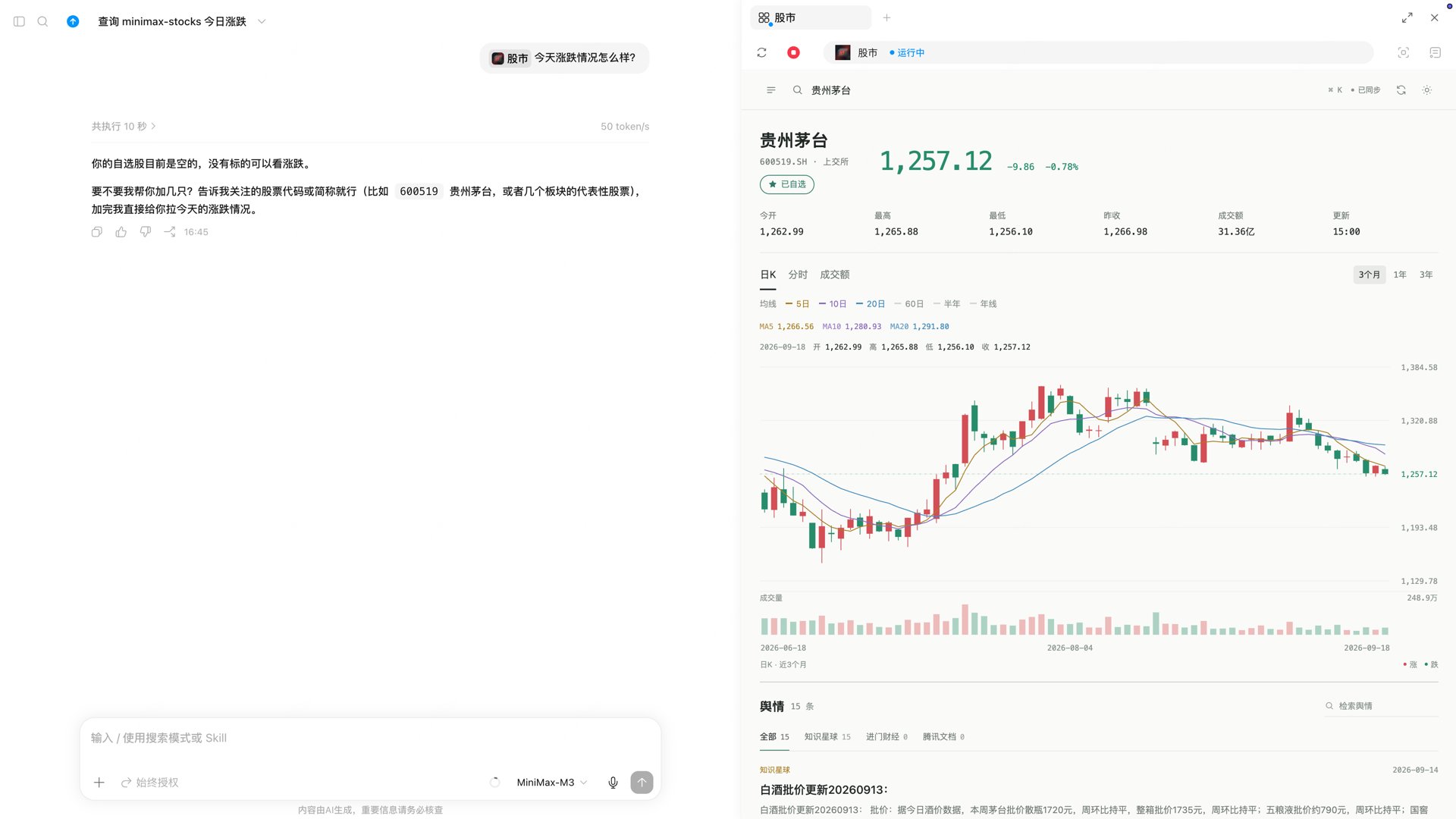
Stocks Mini App
CadQuery Viewer
- View local STL and STEP models in MiniMax Code, and watch models pushed live from CadQuery scripts.
- Mark positions on the model and send them to the conversation in one click, so the Agent knows exactly which face, hole, or edge you mean.
- The Agent can open models in the viewer through MCP tools, and the package bundles a CadQuery parametric-design Skill.
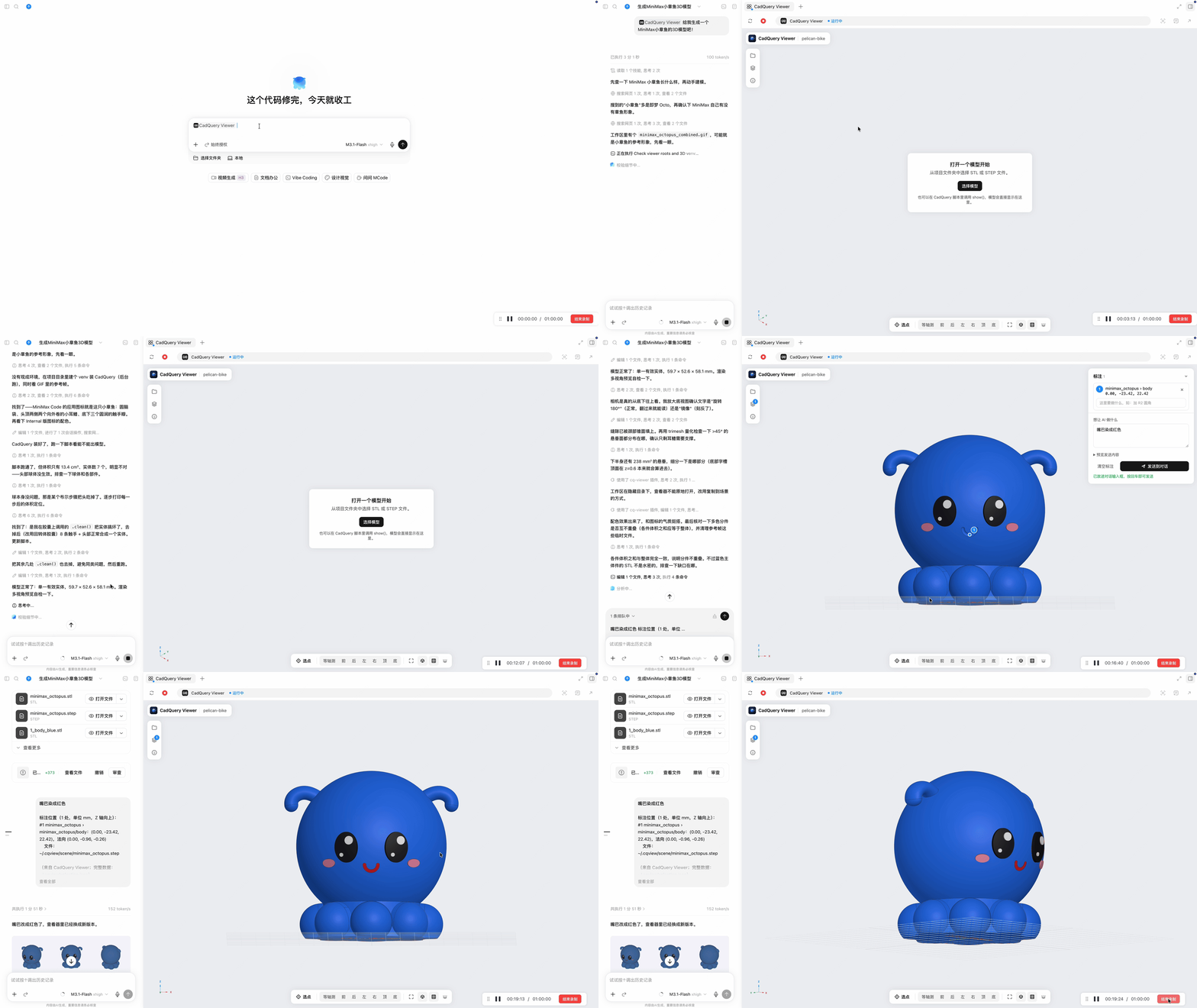
CadQuery Viewer Mini App: one prompt has the Agent build a 3D model of the MiniMax octopus; mark the mouth on the model, note “make the mouth red”, and send it back to the conversation for the Agent to change