

Current submission scope (2026-09-08): The third-party form currently accepts App, MCP, and Skill capabilities. When submitting, choose Desktop (MiniMax Code), Cloud (MiniMax Agent), or both. Delivery target and target region (CN/US) are independent dimensions. Delivery targets are managed in the Marketplace catalog and are not written to
plugin.json inside the Plugin package.Prepare a submission
You can submit a ZIP file or a public GitHub repository. For GitHub, you may specify a branch, tag, commit, or Plugin subdirectory. Both source types follow the same validation, review, and publishing process.
Check progress
You must use the same Feishu account used for the original submission and provide the submission_id and submission email. Once all three match, the result will be sent through a Feishu message.
1. Choose the capabilities to provide
A Plugin may contain only one capability type or combine App, MCP, and Skill capabilities, and must contain at least one capability. The current third-party intake does not accept the
hooks manifest field or Hook JSON files. Packages in other plugin formats must first be converted to the package format in this guide. Desktop support for directly importing other formats does not mean those formats are accepted by this submission form.2. Standard directory structure
- The ZIP root must directly contain
.minimax-plugin/plugin.json. Do not wrap the Plugin in an additional top-level directory inside the ZIP. - File names and paths may contain only ASCII letters, digits, periods, underscores, and hyphens. Use
/as the path separator. - Symlinks, hard links, Git LFS pointers, Git submodules, package installation lifecycle scripts (
preinstall,install, orpostinstallinpackage.json), platform-specific native binaries, and files that depend on the executable bit are not accepted. Portable Skill/MCP scripts may be included and run through an explicit interpreter. - Text files must use UTF-8 without a BOM. JSON files must be objects and must not contain duplicate keys.
3. Write the Plugin manifest
.minimax-plugin/plugin.json is the package entry point. The following example contains both MCP and Skill capabilities. Use an empty array for any capability that is not included.Available categories:
Office, Studio, Design & Sites, Code, Business, Sales, Productivity, Science & Healthcare, Education, and Other.4. Add a Skill
Place each Skill atskills/<skill-name>/SKILL.md and reference it in the manifest’s skills array. The file must begin with YAML frontmatter:namemust exactly match the Skill directory name, anddescriptionmust not be empty.- The body must contain complete instructions that the model can execute directly, rather than only promotional copy.
- Templates, references, and scripts used by the Skill must be included in the package and referenced with relative paths.
- Skill names must be unique within a Plugin. At runtime, a Skill is exposed as
<plugin-name>:<skill-name>to avoid conflicts with other Plugins.
5. Add MCP
Each*.mcp.json file may declare one or more MCP Servers and must be referenced in the manifest’s mcpServers array.stdio,streamable-http, andsseare supported. Thehttpalias is not supported.timeoutis the timeout for a single tool call, in milliseconds. For example,30000means 30 seconds. If omitted, the runtime default is used.stdio.commandmay contain only the name of an interpreter or executable available on PATH; it must not contain a path. Reference scripts in the package through relativeargs.- A remote MCP must use a real, stably accessible HTTP(S) endpoint. Complete
initialize,tools/list, andtools/callvalidation before submitting. - Do not place any secret or user credential in
headers,env, or any other file. If authentication is required, contact MiniMax first to evaluate App/Connector integration.
6. Prerequisites for App integration
Do not place OAuth parameters, API keys, or other authentication data directly in a Plugin. First provide a remote MCP Server that follows the MiniMax App (MCP Server) Integration Guide. MiniMax must complete Connector configuration and joint testing for every target region and confirm a stableprovider. Static submission checks do not verify live Connector availability. After integration is complete, MiniMax will confirm the following reference file:7. Package Size and Security Limits
Use a standard ZIP structure without a wrapper directory. Uploaded source packages may use unencrypted STORE or DEFLATE compression. The system rejects path traversal, absolute paths, backslashes, Unicode filenames, case conflicts, Windows reserved names, special files, and encrypted ZIP files, and enforces the file-count and size limits listed above. After validation succeeds, the system normalizes the contents into a deterministic, STORE-only Marketplace package.
8. Submit a New Plugin or an Update
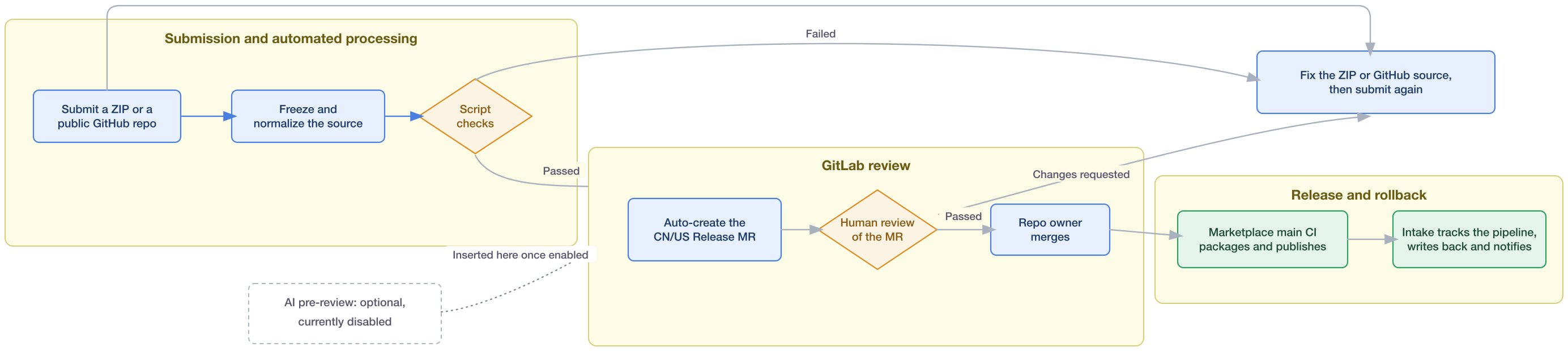
- In the submission form, select either “Submit a new Plugin” or “Update an existing Plugin,” then select the target region (CN/US) and delivery target (desktop/cloud; multiple selections are allowed).
- Choose a source and complete only the corresponding fields. For a ZIP submission, the ZIP root must directly contain
.minimax-plugin/plugin.json. For a GitHub submission, provide the public repository root URL and optionally a Ref and Plugin subdirectory. The system freezes the submitted source so that the same content is used throughout review and release. - When updating an existing Plugin,
namemust remain unchanged and proof of maintenance authorization must be provided. Incrementversionwhenever package contents change. The version may remain unchanged when only CatalogdeliveryTargetschanges and the package contents are identical. First-time submission to another region still uses the new-Plugin operation. The system-generated MR diff shows the exact changes, so no separate change summary is required. - Save the
submission_idafter the submission succeeds. The system normalizes the source and runs script validation. If validation fails, the reason is written back to the record and sent proactively through a Feishu message. AI pre-review is an optional capability that is currently disabled and does not prevent the workflow from continuing. - After script validation passes, the system automatically creates a Release MR targeting the CN and/or US Marketplace
mainbranch according to the selected region, and provides the MR link in the human-review group card. Reviewers inspect the MR diff, Markdown validation report, icon, and CI directly. After confirming that everything is correct, the repository owner merges the MR. - After the MR is merged, the Marketplace
mainPipeline automatically packages and distributes the Plugin. Intake tracks the release job, updates the status to “Publishing,” “Published,” or “Publishing failed,” and proactively sends a Feishu message. To query the status, use the same Feishu account that made the submission and provide thesubmission_idand submission email address. Submitting to multiple regions: The selected operation applies to every target region in the submission. If a Plugin already exists in CN but is being submitted to US for the first time, submit two separate requests: an update for CN and a new Plugin for US. Publishing and listing are separate: “Published” describes the package distribution result, not its current Marketplace visibility. MiniMax manages display order and listing status independently. A newly published name is listed by default; this does not mean it is automatically installed. Updating an existing Plugin preserves its listing status, and updating a delisted Plugin does not relist it. Delisting does not reset a user’s installation, uninstallation, enablement, or disablement choices. Relisting restores availability while preserving those choices. Clients apply the latest status during existing refresh flows, so the change may not take effect immediately on every client. The submission-status form does not read the current listing status. If a published Plugin is not visible, contact MiniMax with yoursubmission_idand target region.
9. Pre-submission Checklist
- The ZIP root or the specified GitHub subdirectory directly contains
.minimax-plugin/plugin.json -
name, the package directory, and the manifest are consistent; if package contents have changed, the version number has been incremented - The icon, name, description, category, and no more than three example queries are all production-ready content
- The Plugin contains at least one capability, and all App, MCP, and Skill files are referenced by the manifest
- Skill frontmatter is complete, and MCP endpoints/commands have been verified
- The package contains no tokens, secrets, personal data, package installation lifecycle scripts (
package.jsonentries:preinstall,install, orpostinstall), symlinks, or platform-specific binaries. Any portable Skill/MCP scripts use an explicit interpreter. - You have the right to submit and distribute the code, copy, icons, and referenced materials
- If the Plugin contains an App, you have contacted MiniMax in advance and confirmed the Connector provider
10. Common Reasons for Rejection
- The ZIP contains an extra wrapper directory, the GitHub subdirectory is incorrect, or the target root is missing
.minimax-plugin/plugin.json. - The Plugin name, version, paths, JSON Schema, or Skill frontmatter does not comply with the specification.
- Capability files are not referenced by the manifest, or the manifest references files that do not exist.
- An MCP uses an unsupported transport, absolute paths, platform-specific dependencies, or contains OAuth credentials/secrets.
- The App provider has not completed Connector integration, or the target environment has not been verified.
- Example queries, descriptions, or icons still contain test content, or copyright, privacy, or data-compliance information is incomplete.
- An update changes package contents without incrementing the version, maintenance authorization cannot be proven, or the MR diff reveals an incompatible change.
11. Data Retention and Communication
- Frozen submission packages, script validation reports, and optional AI pre-review reports in GitLab are retained for 180 days. Operational records and attachments in Feishu Base are not cleaned up automatically; they are retained according to the platform’s current behavior and are handled manually by the owner when there is a genuine operational need.
- Do not include production secrets, user tokens, or unnecessary personal sensitive information in the submission package or form.
- AI pre-review is an optional efficiency feature that is currently disabled. Whether or not it is enabled, the final listing decision is made by MiniMax human reviewers.
- Specifications and validation rules may evolve with the platform. Refer to the current version of this guide and the automated validation results produced after submission. Passing automated prechecks does not guarantee acceptance: human review and production Marketplace CI validation are still required.