Infinite Canvas brings images, videos, HTML pages, and other files into a space you can arrange freely. Keep reference materials and different versions in view while you chat with your Agent, review results, and refine your work.Infinite Canvas
A Visual Workspace for Multimedia Creation

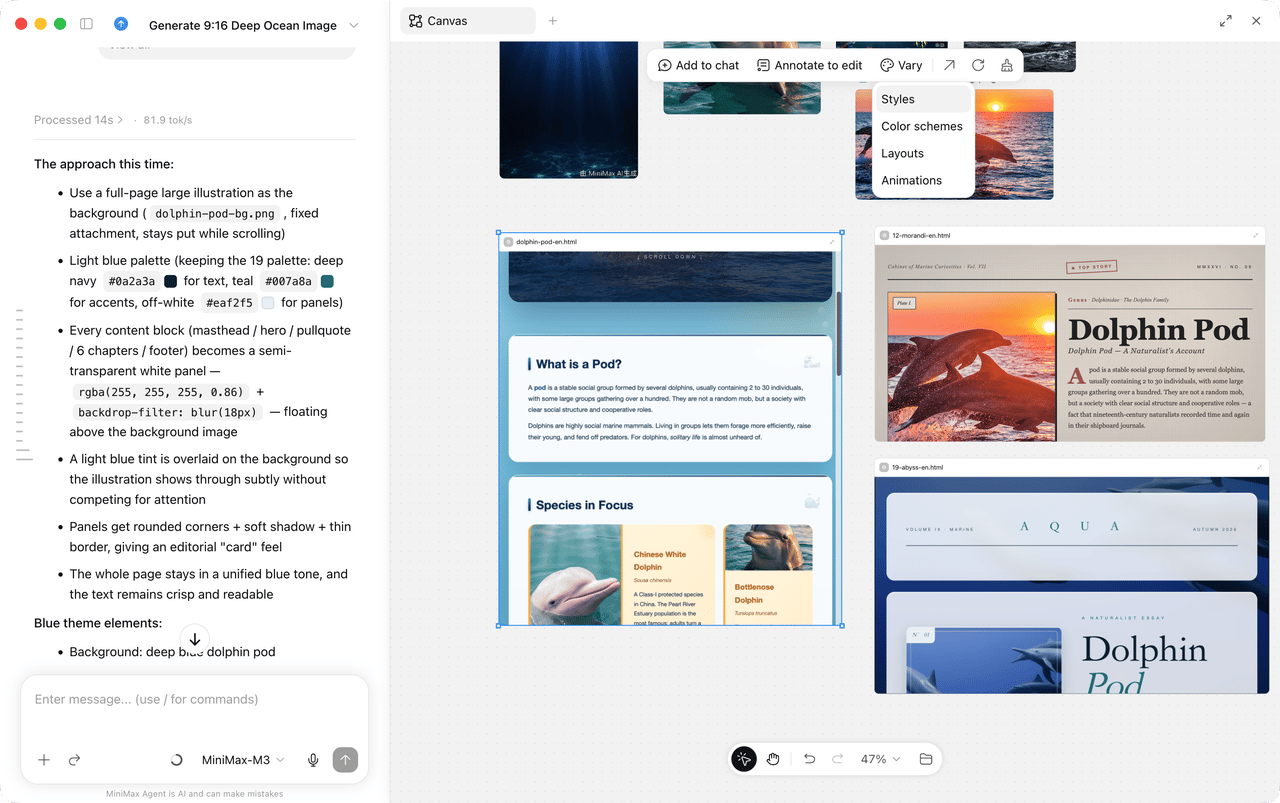
Place reference images, video assets, and generated pages together. Drag to arrange them, zoom in to inspect details, or compare versions side by side. Whether you are choosing images, organizing video assets, or reviewing page designs, you can keep everything in context with less switching between chats, folders, and preview windows.HTML files can be dropped onto the canvas directly. Put multiple page directions side by side, scroll through long pages inside the node, and resize the preview area to see how the layout responds at different widths.Select one or more files on the canvas and choose Add to chat to give your Agent the context it needs for the next step.

Annotate to Edit

Add feedback directly to image nodes and HTML nodes. Select a node, mark the part you want to change, leave a comment, and send the file and annotations back into the conversation.In an image node, drag to select a region and describe your edit. In an HTML node, select a specific element and leave feedback for a heading, button, image, or content section, making it clear where the change belongs. When you need to inspect or operate the page more closely, open the HTML node in the built-in browser.

Explore More Possibilities from a First Draft

Ask your Agent to try a new direction using the content already on your canvas. Add the results back to compare them, choose a version you like, and keep refining it.For HTML nodes, Vary offers starting points such as styles, color schemes, layouts, and animations. Choose an option to add the current file and a suggested prompt to chat, then send it to ask your Agent for multiple variations.

Get Started

In a local task in the desktop app, click + at the top of the right panel and select Canvas. Add files from your workspace, or drag files from your computer onto the canvas to start creating.
Infinite Canvas is best for multimedia and creative workflows. For precise file edits, use the file panel to locate the original file.