✨ Build with us!
MiniApp follows the plugin specification. To get the complete development workflow, use the/miniapp-creator Skill in the MiniMax Code desktop app.
You do not have to start from scratch. Tell the Agent, “Build me a dashboard for XX,” and it will initialize the package, build the frontend and backend, publish and open the app, and check the result with screenshots. You just review the result and ask for changes.
You can submit your MiniApp to the official plugin marketplace in either of these ways:- Enterprise developers: We recommend submitting your MiniApp to the MiniMax Code plugin marketplace through the official partnership process. If your MiniApp uses an MCP service officially provided by your company, please contact our team first. For details, see: Plugin Development and Submission Guide
- Individual developers: Join the MiniMax open-source community. Our team will regularly select high-quality MiniApps for the marketplace. Visit the MiniMax MiniApps open-source community. Your expertise deserves to be seen!
💡 What is MiniApp?
AI should work with professionals beyond a one-time handoff. Coding Agents and developers do not deliver code in a single pass. Yet many AI products today try to deliver a lawyer’s, analyst’s, or operations professional’s work in one go. Moving from a first draft to a final deliverable should involve people and AI refining the work together, but that process is often fragmented. Collaboration between people and AI is still at an early stage. Developers write in an IDE; lawyers, analysts, and operations professionals write within their own fields. Just like software development, real work requires continued progress and refinement before it becomes a dependable deliverable. An AI that writes some text and walks away falls short in any serious professional task, because the goal is to deliver finished work, not simply produce text.MiniApp’s guiding principle: keep people involved in collaboration and decisions—Human-in-the-Loop.
We respect every industry, every profession, and the expertise people develop over time. AI should be your most capable executor, amplifying your abilities without pretending to possess your professional judgment. MiniApp aims to reconnect the fragmented process from refinement to delivery.
- Connect capabilities: Reliably connect to and use open-source MCP servers and first-party plugins, bringing data and actions into your professional workflow.
- Build interfaces: Create your own work interface, giving each industry a workspace that fits its needs.
- Collaborate anytime: Make the Agent an available, dependable work assistant. Of course, you can also ask it to do anything else you find interesting! In the way of working we envision, lawyers would not submit an AI-written legal complaint directly to a court; analysts would not make investment decisions solely on AI-generated views; and operations professionals would not launch an AI-generated campaign plan unchanged. Instead, they would use AI to research the background, organize materials, prepare drafts, improve wording, and spot omissions. Then they would return to their professional workspace to review, revise, and approve before asking AI to continue. The product maintains this boundary as follows: when you pass content from a MiniApp page to the Agent, it first appears in your message input. You can edit and confirm it before sending. AI does not press Send for you.
🧩 MiniApp architecture: a plugin with a frontend and backend
In the MiniMax Code desktop app, a MiniApp appears as a page in the right-hand panel. Select it from the panel’s “+” menu, or@-mention an installed MiniApp in a conversation, and it will open there.
Technically, a MiniApp is a regular plugin package with a runnable page and backend. Any Skills, MCP servers, and Connectors declared in the same package continue to work as usual. It can be a dashboard or a monitoring tool: an application that also reflects an understanding of the work it supports.
MiniApp does not prescribe a technology stack. The host only requires an entry point that is a Node module exporting start(context) and serves requests on the designated port. The implementation behind that entry point is unrestricted: it can use Node alone, or have Node launch a service written in Python, Go, or another language. The MiniApp is responsible for the lifecycle of these child processes; the host manages only the entry-point process.
We are gradually making Agent capabilities available to MiniApps, including MCP, third-party apps authorized through OAuth, and Agent Message. A MiniApp also acts as an MCP service itself, exposing all its capabilities to the Agent for two-way calls and collaboration.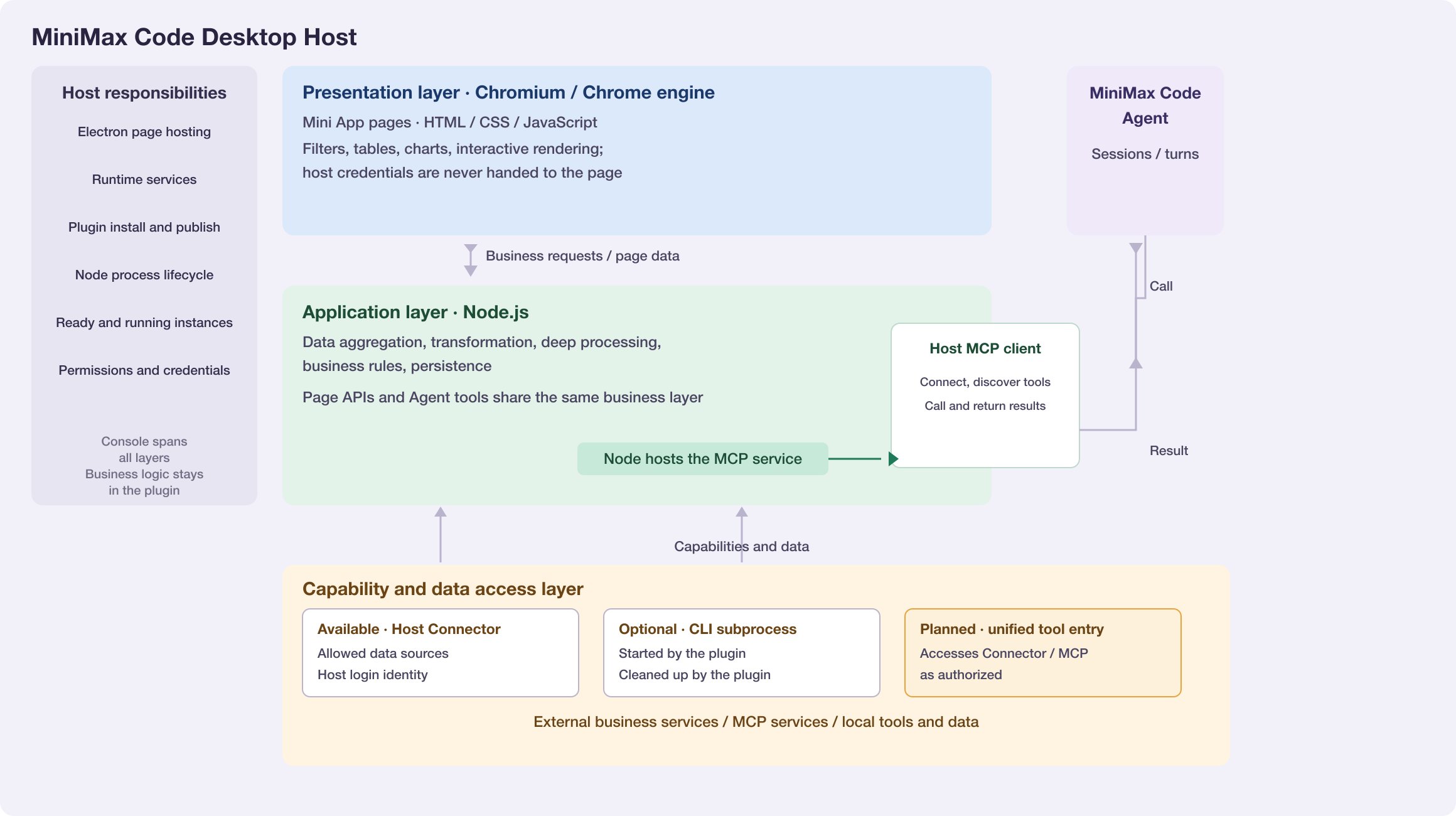
⚙️ How MiniApps run and are published
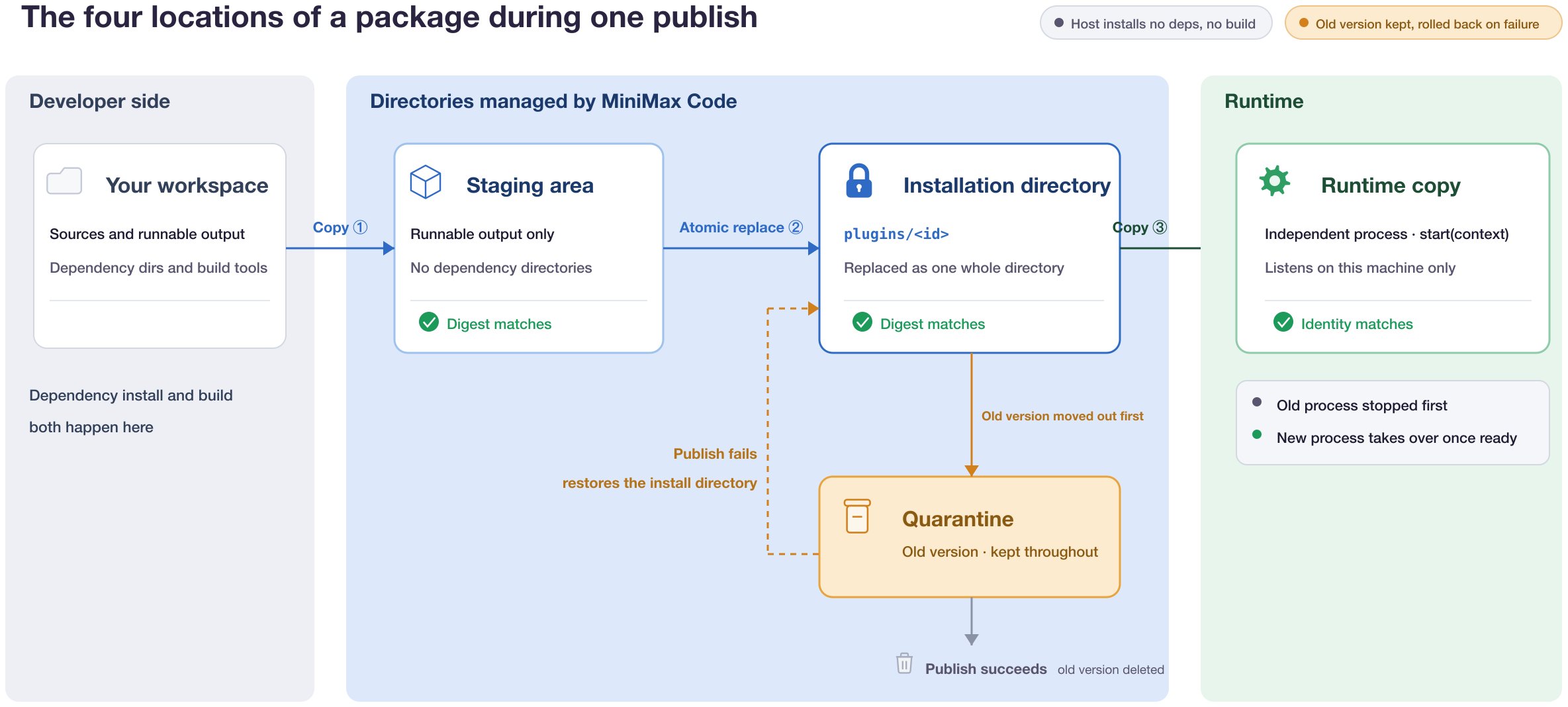
A MiniApp does not run directly from its installation directory. During publishing, the host performs these steps in order:- Stage: Copy the package to a staging area managed by the host. The host does not install dependencies or run a build, so the package must be ready to run. Dependency directories such as
node_modulesare excluded from publishing. After copying, the host rereads the manifest and file digests. Publishing fails if they differ from the originals. - Install: Move the previous version into quarantine, atomically replace the installation directory with the staged copy, and verify the digests again.
- Start: Create a separate runtime copy from the installation directory, verify its identity, and start it in a dedicated process. The old process is stopped first, and the new process takes over only after it is ready. If any step fails, the previous version is moved back from quarantine and the installation directory is restored to its original state.
🚀 What’s next for MiniApp
MiniApp is still evolving. The capabilities below are planned directions and are not all available yet. We will prioritize real work scenarios to make MiniApps easier to use and better at collaborating with AI. Actual availability and release dates will depend on the released version.✨ Official examples: stocks and road trip planning
For the initial release, the MiniApp creation team built two products through Vibe Coding for you to explore.📈 Stocks
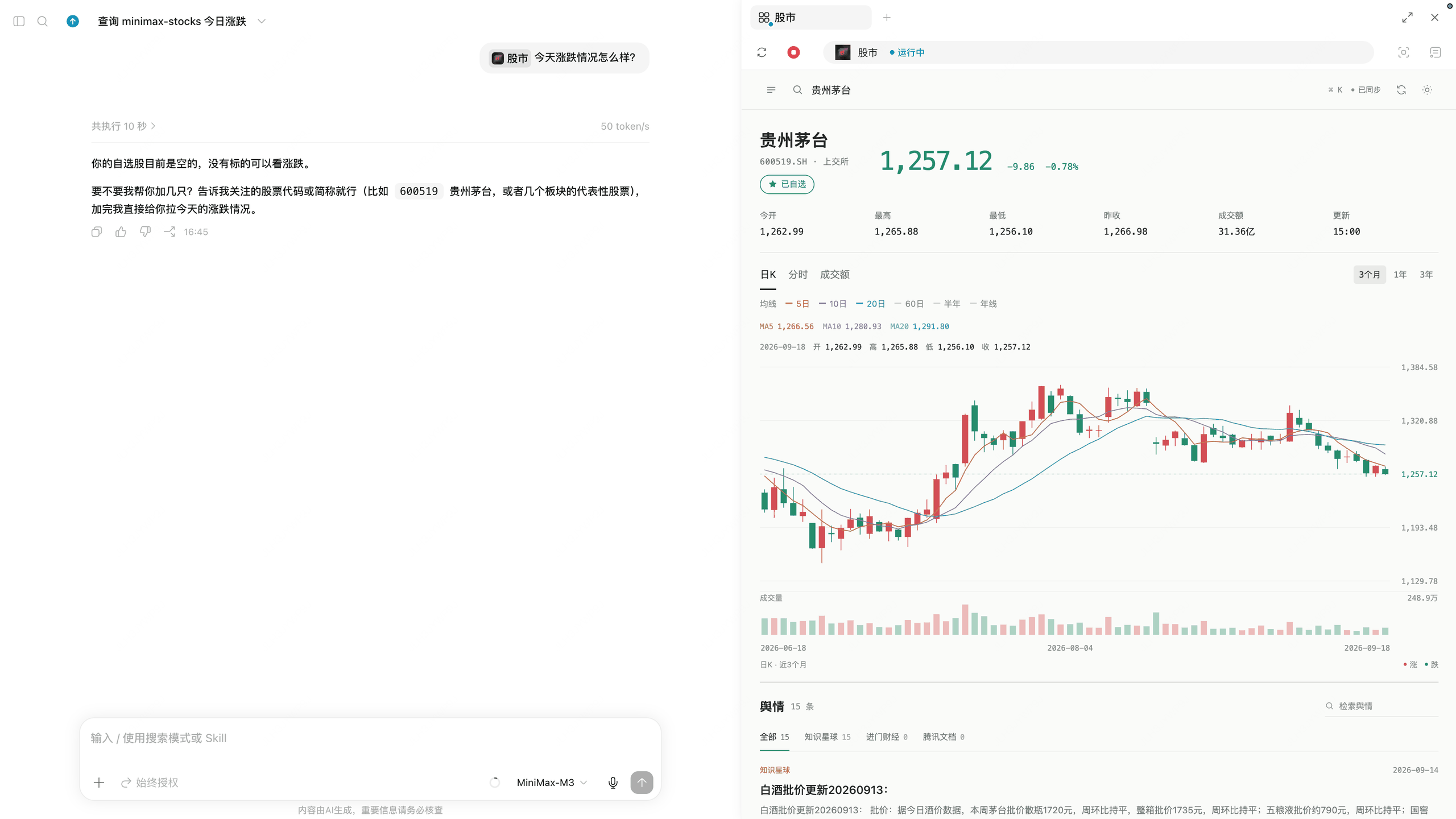
- Full stock candlestick charts.
- Stock watchlists.
- A dashboard that brings together stock information scattered across platforms such as 知识星球 (Zsxq), 进门财经 (Jinmen Finance), and 腾讯文档 (Tencent Docs).
- The Agent can see all content on the dashboard and is ready to pick up the work whenever you need help.
🚗 Road trip planning
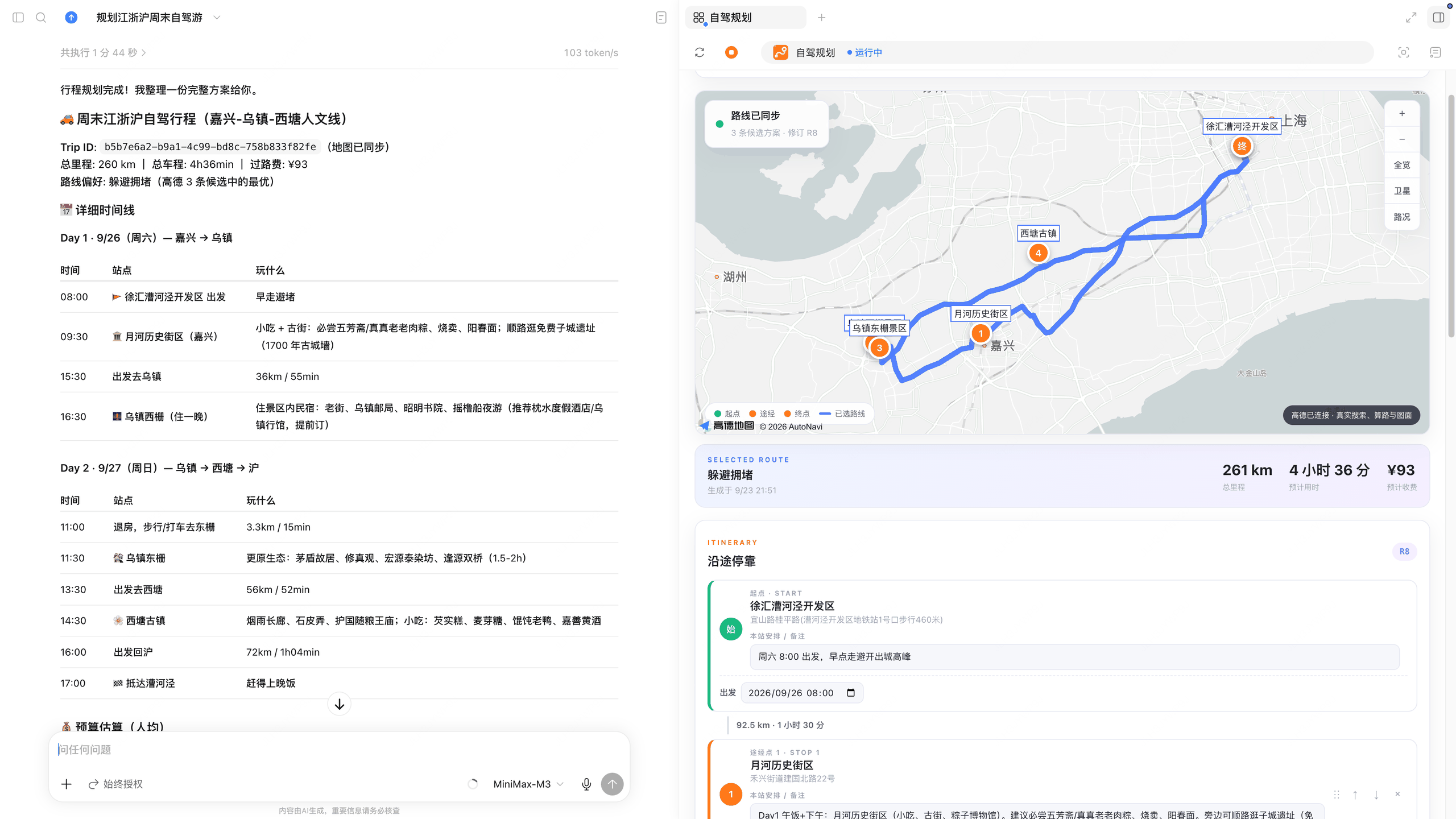
- Navigation with Amap (高德地图) and route visualization on a map.
- Information search on Xiaohongshu (小红书).
- Image generation for Xiaohongshu, with quick previews.